This data comes straight from a weather station on the roof of my house.
Why?
I’ve always been interested in the weather. It started with growing up surfing on Long Island. While we do get quality surf conditions, it doesn’t happen nearly as often as somewhere like Southern California, and most of our waves depend on fairly local weather instead of swell from thousands of miles away.

The old 44025 buoy. Photo: NOAA
Before sites like Surfline.com made condition reports and live camera feeds easy to check, we had to figure out wave quality from raw data. The National Weather Service has a network of weather reporting buoys, and the page for our local buoy, 44025, is probably one of the pages I’ve visited most in my life. Checking swell height, swell period, and wind direction was how we decided whether it was worth driving to the beach.
All this to say, I enjoy tracking the weather, and for as long as I’ve been a homeowner I’ve had a personal weather station (PWS). Besides checking the current conditions in my own backyard, I use the station’s data to run a few home automations. Rain totals help determine when the lawn needs watering, and the light sensor triggers the outdoor lights based on how dark it actually is around dawn and sunset rather than a fixed schedule.
Weather data from my station is also published to the Citizen Weather Observer Program (CWOP), Weather Underground, PWSWeather, and Windy.
How It Works
Here’s how a reading gets from my roof to this page.
- Ecowitt weather station
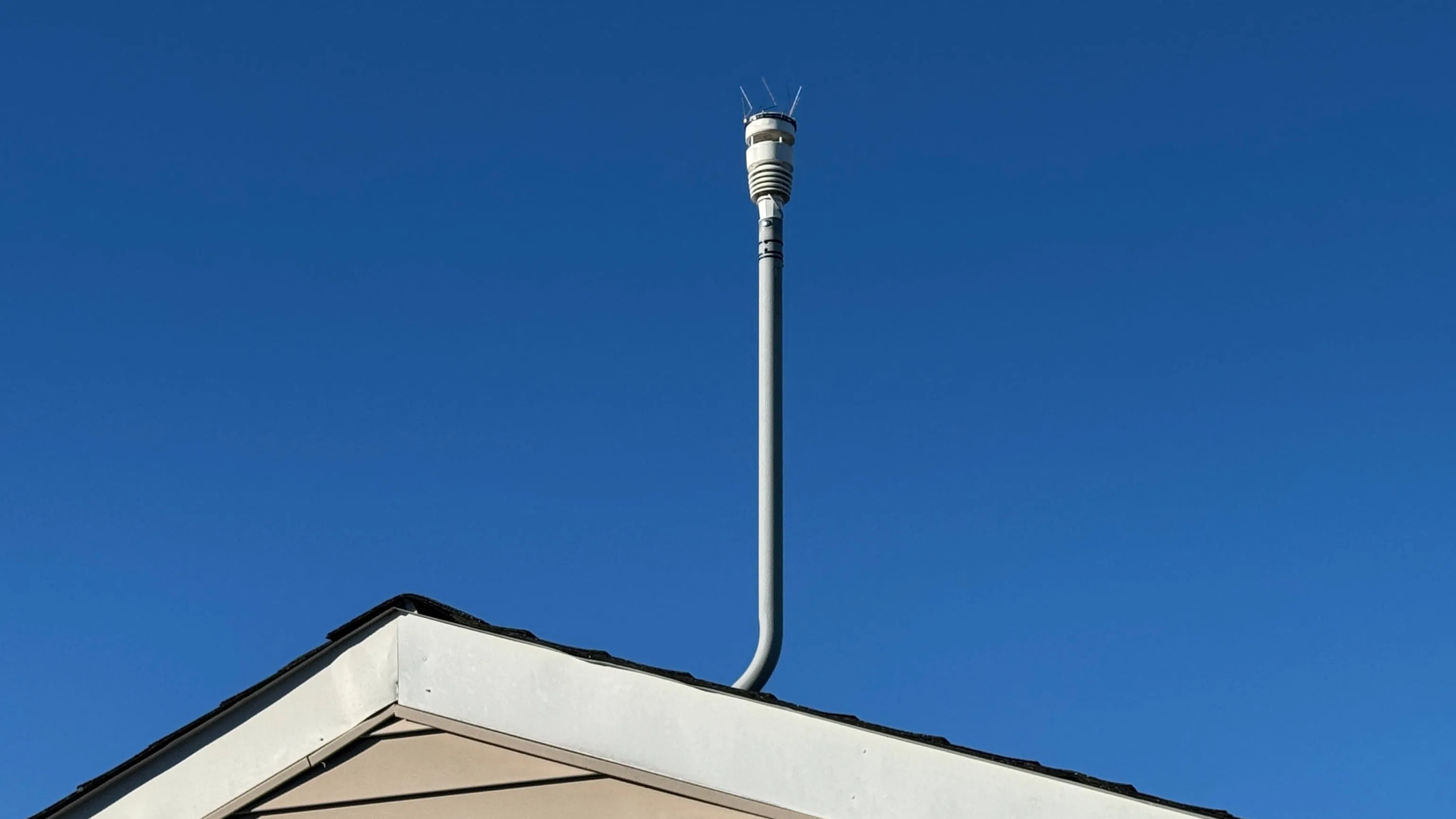
The station is an Ecowitt WS90 mounted on a pole on my roof. It’s an all-in-one sensor array that measures temperature, humidity, wind, rain, UV, and light. Every 8.8 seconds it radios a reading down to its gateway, which is wired into my home network.
- pullHome Assistant polls the gateway
Every 10 seconds, Home Assistant asks the gateway for its latest readings over my local network.
- Home Assistant
Home Assistant runs on a Home Assistant Yellow rack mounted in my basement. Ecowitt’s official integration makes the readings available as
sensor.pws_*entities.Those readings run a few things around the house. Before the sprinklers water the lawn each morning, Home Assistant checks how much rain has fallen in my yard and how cold it is, then skips watering if it isn’t needed. It also stops the sprinklers mid-run if the wind picks up or it starts raining.
The outdoor lights use the light sensor instead of a timer. When the light level stays below about 250 lux for a couple of minutes, they turn on. Once it’s bright again, they turn off.
To get the data onto this site, I added a
rest_commandtoconfiguration.yamlwith my Upstash URL and token, along with an automation that bundles the station’s sensors into a JSON payload and passes it to that command.configuration.yaml rest_command:send_website_weather:url: !secret upstash_weather_set_urlmethod: postheaders:Authorization: !secret upstash_weather_authcontent_type: "application/json"payload: "{{ payload | tojson }}"timeout: 10automation.yaml alias: Website Weather Uploaddescription: >-Sends weather station readings to the johnzanussi.com weather widget(Upstash KV) every 5 minutes.triggers:- trigger: time_patternminutes: /5actions:- action: rest_command.send_website_weatherdata:payload:updated: "{{ utcnow().isoformat() }}"temp_f: "{{ states('sensor.pws_outdoor_temperature') | float(none) }}"13 collapsed linesfeels_like_f: "{{ states('sensor.pws_feels_like_temperature') | float(none) }}"dewpoint_f: "{{ states('sensor.pws_dewpoint') | float(none) }}"humidity: "{{ states('sensor.pws_humidity') | int(none) }}"wind_mph: "{{ states('sensor.pws_wind_speed') | float(none) }}"gust_mph: "{{ states('sensor.pws_wind_gust') | float(none) }}"wind_dir_deg: "{{ states('sensor.pws_wind_direction_10m_avg') | int(none) }}"max_gust_today_mph: "{{ states('sensor.pws_max_daily_wind_gust') | float(none) }}"pressure_inhg: "{{ states('sensor.pws_relative_pressure') | float(none) }}"pressure_trend_inhph: "{{ states('sensor.pws_pressure_trend') | float(none) }}"rain_today_in: "{{ states('sensor.pws_daily_rain_piezo') | float(none) }}"rain_rate_inh: "{{ states('sensor.pws_rain_rate_piezo') | float(none) }}"uv_index: "{{ states('sensor.pws_uv_index') | int(none) }}"solar_wm2: "{{ states('sensor.pws_solar_radiation') | float(none) }}"condition: "{{ states('weather.weather_station') }}"mode: single - pushHome Assistant uploads the payload
Every 5 minutes, the automation
POSTs that payload to Upstash’s REST API over HTTPS. - Upstash KV
Upstash is a hosted Redis key-value store with an HTTP API, so Home Assistant can write to it with a plain web request. Every upload overwrites the same
weather:currentkey. If the uploads ever stop, the last reading sticks around, so the site still has something to show.I went with Upstash because it’s built right into the Vercel Marketplace, so setting it up only took a couple of clicks.
Here’s the latest payload:
Loading the latest payload… - pullThe site reads the latest payload
When someone loads this page, the site requests
weather:currentfrom Upstash over HTTPS using a read-only token. Vercel’s edge caches the response for a minute and can keep serving that cached copy for up to 5 minutes in the background while it fetches a fresh one.  johnzanussi.com
This site is hosted on Vercel. The weather widget at the top of this page and the JSON payload above are Astro server islands loaded with
server:defer. They’re rendered on the server when you visit, while the rest of the page stays static. If the latest reading is more than 30 minutes old, the widget dims it so it’s clear the data is out of date.Here’s a simplified version of the code that reads from Upstash.
src/utils/pws.ts import { KV_REST_API_URL, KV_REST_API_READ_ONLY_TOKEN } from 'astro:env/server';export type WeatherReading = {data: CurrentWeather;raw: string;};const WEATHER_KEY = 'weather:current';export const getCurrentWeather = async () => {const response = await fetch(`${KV_REST_API_URL}/get/${WEATHER_KEY}`, {headers: { Authorization: `Bearer ${KV_REST_API_READ_ONLY_TOKEN}` },});const { result } = await response.json() as { result: string | null };const data = JSON.parse(result) as CurrentWeather;const reading: WeatherReading = {data,raw: JSON.stringify(data, null, 2),};return reading;}

With everything running normally, a reading is at most 10 minutes old by the time it shows up here, though it’s usually much less than that. In addition to wiring up the weather data and writing this page, I also built a bunch of new Astro components for the site. I used Claude Code to help out with some of it, especially the styles for different breakpoints and code review.
It’s been a fun project tying the PWS, Home Assistant, and my website together.
As always, all the code that powers this site is on my GitHub. If you’ve got a station of your own or questions about any of this, let me know in the comments.
Comments